
For CPAs, Enrolled Agents, bookkeepers & advisors
A free accounting workspace
for your practice.
Bring connected client books into one place, work with EazeAI assistance, and participate in revenue sharing on qualifying referrals.
Your practice's workspace is free. Client subscriptions are separate.
CPA Dashboard
Here's an overview of your CPA practice today.
Client organizations
5 total4 active| Organization | Client contact | Access type | Status | Billing | Actions |
|---|---|---|---|---|---|
| Jamie Reedjamie@example.com(202) 555-0101 | Created by you | Active | Eaze Premium | ||
| Taylor Brookstaylor@example.com(202) 555-0102 | Client invited | Active | Eaze Pro | ||
| Jordan Ellisjordan@example.com(202) 555-0103 | Created by you | Active | Eaze Premium | ||
| Casey Lanecasey@example.com(202) 555-0104 | Client invited | Active | Eaze Pro | ||
| Morgan Hayesmorgan@example.com(202) 555-0105 | Created by you | Pending | Not selected |
Who the program is for
One partner program. Several ways to work with us.
Accounting & CPA firms
Bring connected client books into one workspace, review with EazeAI assistance, and keep the client relationship yours.
Bookkeepers
Run monthly books for several clients from one place, with role-based access on each client's eligible plan.
Business advisors & consultants
Introduce clients who need software, and earn on qualifying referrals under the partner agreement.
Technology & integration partners
Talk to us about connecting your product or service to EazeAccounts customers.
The partner agreement offers referral, revenue-share and hybrid-services models. Which models, rates and eligibility apply to you are set out in the program schedule when you join; nothing here guarantees a rate or a payout.
Built for the way practices work
Client visibility, review, and access in one workspace.
Open each client's books.
Move between connected clients and their books from a single partner workspace.
Review with EazeAI assistance.
Explore transactions and reports with EazeAI. Use the response as a starting point for your review, not a substitute for professional judgment.
Collaborate with the right access.
Work alongside clients on eligible plans, with permissions that fit each person's role.
6practice features
Accounting software built for a practice, not just a business.
Most small-business accounting tools treat the accountant as an extra user on the client's account. The EazeAccounts partner workspace is the other way round: your firm has its own dashboard, its own client list, and its own record of who can see what, and each client's books open from there.
- Every client in one dashboard
- Access requests with an audit trail
- Subscribe clients from your firm account
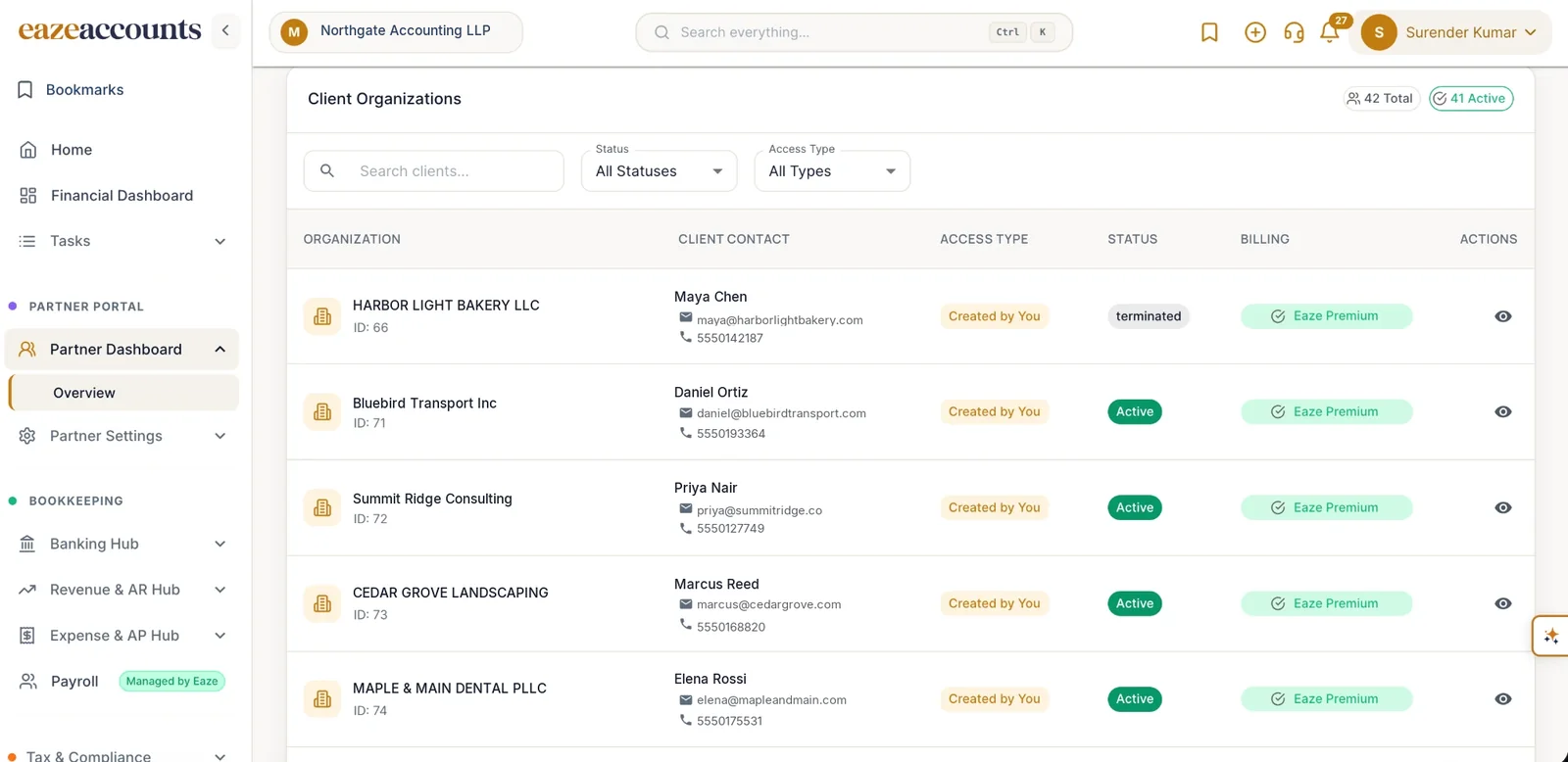
Firm-level view with statistics across every client.
Maintain your client list, invite new clients and stand up a new client organisation through a guided wizard.
Subscribe a client to a plan directly from your firm account.
Request, grant and revoke access to client books, with a full audit trail on both sides.
Publish your firm's details, services and specialisms.
Businesses without an accountant can search our directory, view profiles and request access.
How a bookkeeper uses it month to month
Client bank feeds arrive through Plaid on their own, so the month starts with transactions already in the books. Smart Rules categorize the recurring ones, EazeAI proposes matches when you reconcile each statement, and the unmatched-entries workbench holds the exceptions with a confidence rating on each, so the review is a short list rather than a full pass. Every reconciliation is kept with its own report, and the client can see the same books you do.
Bills the client uploads are read by EazeAI and routed for approval; invoices, reminders and online payments run on the client's side without your involvement. Reports come from the same ledger: profit and loss, balance sheet, cash flow, trial balance and ageing, on demand, for each client. Tax and compliance tools and fixed assets are available on the client's plan from Smart upwards.
What it costs your firm and your clients
The partner workspace is free for your practice: no seat fee, no monthly charge, no minimum client count. Clients pay for their own software plan. Premium includes accountant access and Pro adds advanced collaboration, so those are the plans to put a client on when you will be working in their books; Free and Smart do not include accountant access. You can subscribe a client to a plan directly from your firm account. The pricing page lists what each plan includes, and the partner agreement sets out referral and revenue-share terms.
Moving a client from QuickBooks
EazeAccounts has an official QuickBooks import: sign in to the client's QuickBooks account from inside EazeAccounts and bring the history across, prior years included. Reconnect the bank feeds, check the opening balances against the last reconciled statement, and carry on. The switching guide lists the checks in order, and the comparison covers how the two products differ for a practice.
Partner access and revenue sharing
Free for your firm. Revenue sharing on qualifying referrals.
Your client engagements remain between your firm and your clients. Software subscriptions and any optional EazeAccounts services have their own terms. Review the partner agreement for referral eligibility and payment details.
- No fee for the partner workspace
- Revenue-share opportunities under agreed terms
- Optional services, separate from your own engagements
Your practice
Your clients
Premium includes CPA access. Pro adds advanced collaboration. Client software is billed separately under the selected plan.
View client plansCommission rates, eligible referrals, attribution, and payment terms are defined in your partner agreement. No revenue amount is guaranteed.
Partner agreementPartner onboarding
Review the workspace, the terms, and your first client setup.
Meet the workspace.
Book a live partner walkthrough. See client management and ask the questions that matter to your firm.
Make the partnership official.
Apply with your firm details, complete verification, and review the program terms with our team.
Connect your clients.
Choose the right client plans and agree an onboarding approach that fits their existing books.
Good questions. Clear answers.
A few things you might be wondering.
Need a little more detail? We are happy to help.
Talk to our teamYes. The EazeAccounts partner workspace is free for accounting practices, bookkeepers and advisors. Your clients' accounting software subscriptions are separate. Premium includes CPA access and Pro adds advanced CPA collaboration.
The partner program includes revenue sharing on qualifying referrals. Eligibility, rates, attribution, and payment terms are set out in your partner agreement. Talk to our team about the model for your practice before making earnings assumptions.
Your engagements for bookkeeping, tax, and advisory services remain between your firm and your clients. Clients contract separately with EazeAccounts for software and any optional services. Review responsibilities and service scope with our team before onboarding, together with the Client Relationships section of the partner agreement.
Yes. Book a partner walkthrough for a live demonstration of the multi-client workspace and a discussion of client onboarding and the partnership model.
Complete the partner application with your firm details. Our team can walk you through verification, the program terms, and onboarding your clients. Existing partners can sign in directly to the partner portal.
See how your firm and clients can work in EazeAccounts.
Walk through client books, accountant access, onboarding, and referral terms with our team.