
Bank feeds and reconciliation
Bank reconciliation
without the Sunday afternoon.
Connect your accounts through Plaid, let transactions come to you, and reconcile each statement with EazeAI suggesting the matches. Every run is kept, every sign-off can be undone, and your accountant can see it all.
Read-only bank connections. Available on every plan, including Free.
How it works
From bank feed to signed-off statement.
Reconciliation is the step that turns a list of transactions into books you can trust. EazeAccounts keeps it to three moves and does the matching work for you.
Connect the account.
Link a bank or credit-card account through Plaid with read-only access. EazeAccounts never sees or stores your banking credentials. Accounts you cannot connect take a CSV or statement import instead.
Let the transactions arrive.
New activity lands in EazeAccounts on its own. Smart Rules categorize the repeats, duplicate checks catch anything that came in twice, and an email tells you when a feed has synced or needs attention.
Match and reconcile.
Open the statement, review the matches EazeAI proposes between statement lines and your ledger, accept them one at a time or as a set, post any adjustments, and sign off. Every run is kept with its own report, and you can undo if something needs a second look.
In the app
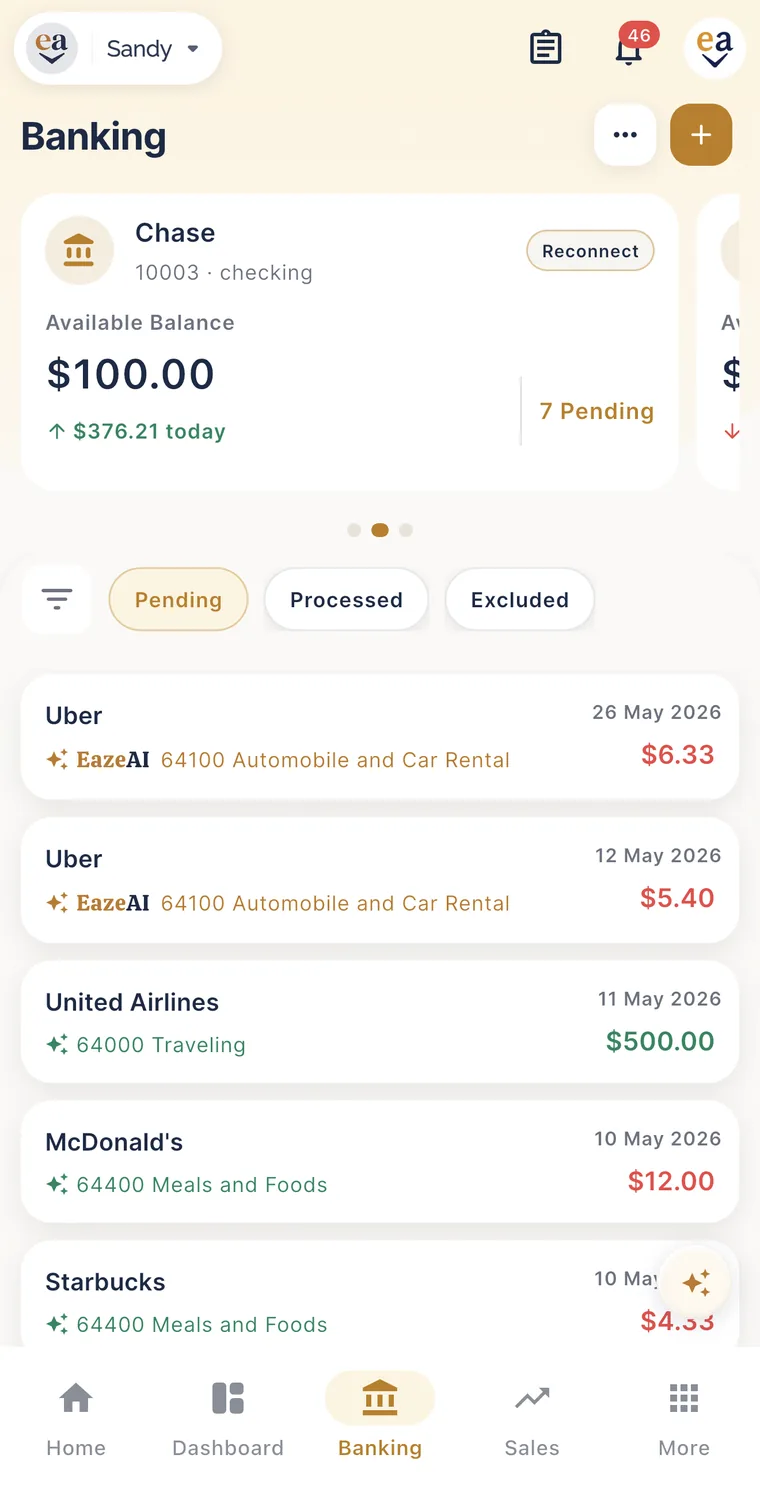
Every transaction arrives with a suggested category.
The Banking screen on the phone and the banking hub on the web show the same feed: each pending transaction with the account it came from, the payee, and the category EazeAI proposes. Accept the suggestion, change it, or set a Smart Rule so the next one categorizes itself. Reconciliation runs against the same list, so nothing has to be entered twice.
10features
Everything in bank connections.
The complete list, as it ships. Nothing here is planned or behind a waiting list.
- Connect through Plaid
- Import transactions
- Reconcile with confidence
Connect your bank and credit-card accounts through Plaid with read-only access. We never see or store your banking credentials.
New transactions arrive in EazeAccounts on their own, ready to review.
Set conditions once and let similar transactions categorize themselves. Preview exactly which transactions a rule affects before you save it.
Match statement lines, post adjustments and sign off, with the option to undo if something needs a second look.
Every reconciliation you complete is kept, with a detailed report for each run.
Bring in transactions by CSV or statement file for accounts that aren't connected.
See suggested matches between bank activity and your ledger, with a confidence rating on each.
Layered checks catch duplicate or irregular transactions before they reach your books.
When you close a statement, EazeAI proposes matches between statement lines and your ledger; accept them one at a time or apply the whole set.
An email when a feed finishes syncing, and another if it needs your attention.
Why it is worth doing monthly
Reconciled books are the ones your accountant can use.
A reconciled statement means every dollar the bank recorded is in your books once, in the right category. That is what makes the profit and loss real, keeps sales tax and year-end filings from becoming a clean-up job, and gives a bookkeeper or CPA something to review instead of something to rebuild. On Premium and Pro your accountant works in the same books through their free partner workspace, so the reconciliation you sign off is the one they see.
What you see after each run
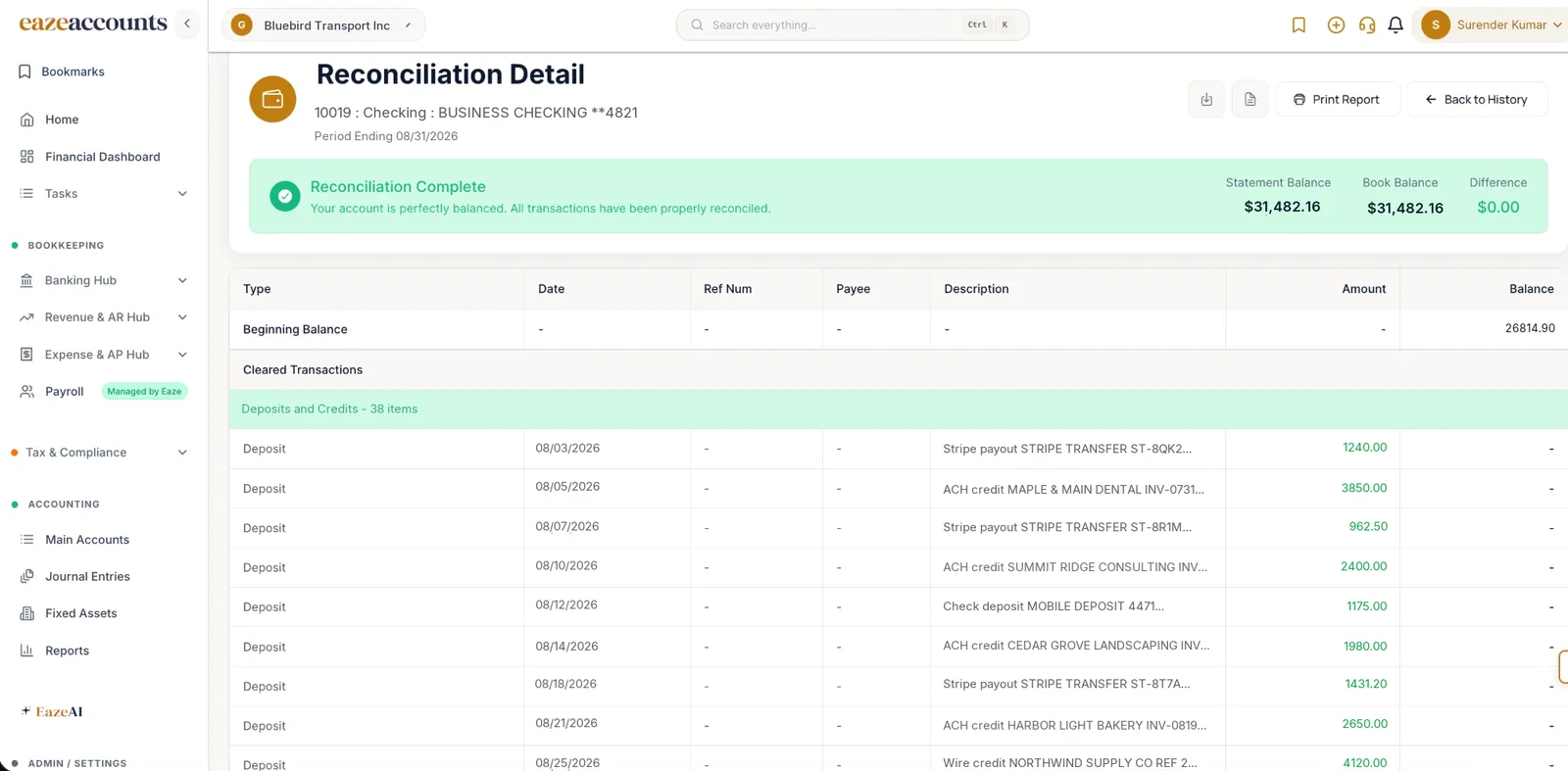
A kept reconciliation report
Opening and closing balances, every matched line, adjustments posted, and who signed off. Kept for every statement so an audit trail builds itself.
Unmatched entries workbench
Anything that did not match sits in one place with suggested pairings and a confidence rating, so the exceptions take minutes rather than the whole session.
Good questions. Clear answers.
Questions about reconciliation.
Need a little more detail? We are happy to help.
Talk to our teamReconciliation is checking that what your books say happened matches what the bank says happened, statement by statement. It catches missed transactions, duplicates, bank errors and fraud, and it is the step that makes your profit and loss and balance sheet trustworthy. Most accountants will not sign off on books that have not been reconciled.
EazeAccounts connects to most U.S. banks and credit cards through Plaid. If an account is not available through Plaid you can import transactions from a CSV or statement file and reconcile it the same way.
No. The connection is read-only. It imports transaction data so you can categorize and reconcile; it cannot initiate payments or transfers.
When you close a statement, EazeAI proposes matches between statement lines and ledger entries, each with a confidence rating. You stay in control: accept a suggestion, change it, or match by hand. Smart Rules handle the transactions that recur every month so they categorize themselves.
Yes. A completed reconciliation can be reopened if something needs a second look, and every run is kept in the reconciliation history with a detailed report, so there is always a record of what was matched and when.
Yes, for two connected bank accounts, with no limit on transactions or categorizations. Smart, Premium and Pro connect more accounts and add fixed assets, tax and compliance tools and larger EazeAI allowances. Paid plans are $1/month for first 3 months.
Coming from QuickBooks? The QuickBooks import brings your history across, and the comparison shows how reconciliation and bank feeds line up. Browse the rest of the product on the all-features page.
Reconcile your first statement this week.
Connect two bank accounts on the Free plan, or book a demo and watch a statement reconciled end to end.